
Choosing a web hosting for your online business is an important step.
You must look for a reliable service, with a 24/7 support and a good value for money. But most of all, a fast web hosting!
In this post, I’m going to share my experience with A2 Hosting, a quality service which includes all these factors.
Table of Contents
A2 Hosting New Account Registration
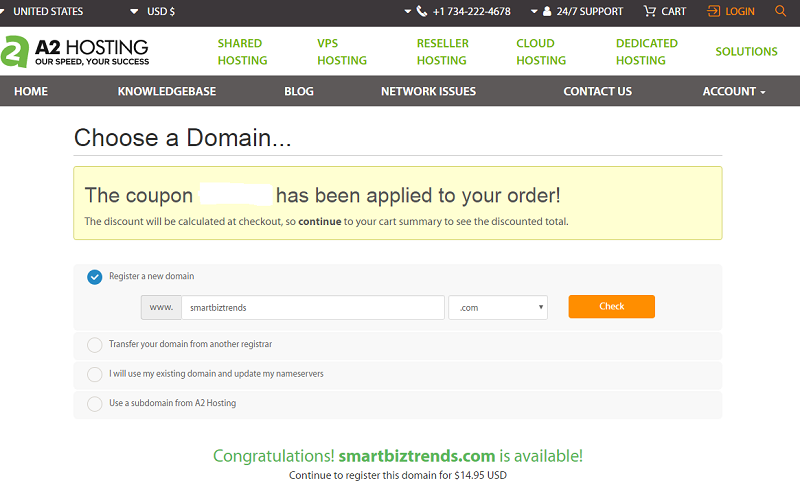
I started with searching and registering a new domain name to create my account with A2 Hosting.
Note that you can do either this way, or:
- transfer your domain name from another registrar;
- use your existing domain and update the name servers;
- use a subdomain from A2 hosting.
I was lucky to find a good domain name: smartbiztrends.com (I also got a nice coupon code to receive a huge discount).
The next step is configuring the desired options.
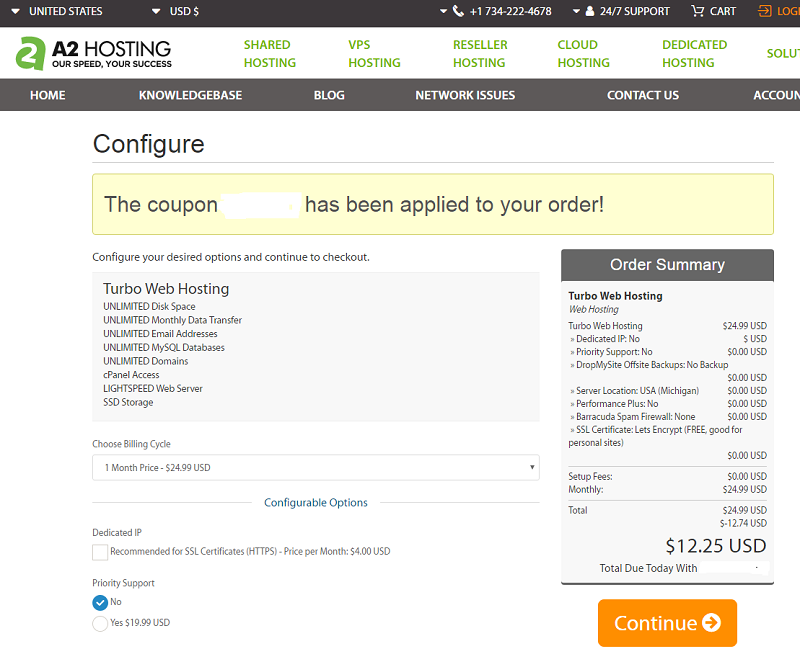
First, you need to select the kind of package you want. I went with the Turbo Web Hosting, which include:
- unlimited disk space
- unlimited monthly data transfer
- unlimited email addresses
- unlimited MySQL databases
- unlimited domains
- cPanel access
- LIGHTSPEED web server
- SSD storage
Then, choose the billing cycle, to get a different price/discount, depending if you pay one month, 12 or 24 months.
You may want to add a dedicated IP (recommended for SSL Certificates (HTTPS).
Additional options include:
- turbo boost (to get unlimited domains or 20x faster)
- priority support
- offsite backups
- server location (USA, Europe or Asia)
- Barracuda SPAM firewall
- SSL certificate
- Railgun
- CMS auto-install applications
- Cloudfare.
Once you have selected all these options, you can continue to the next step, like I did here:
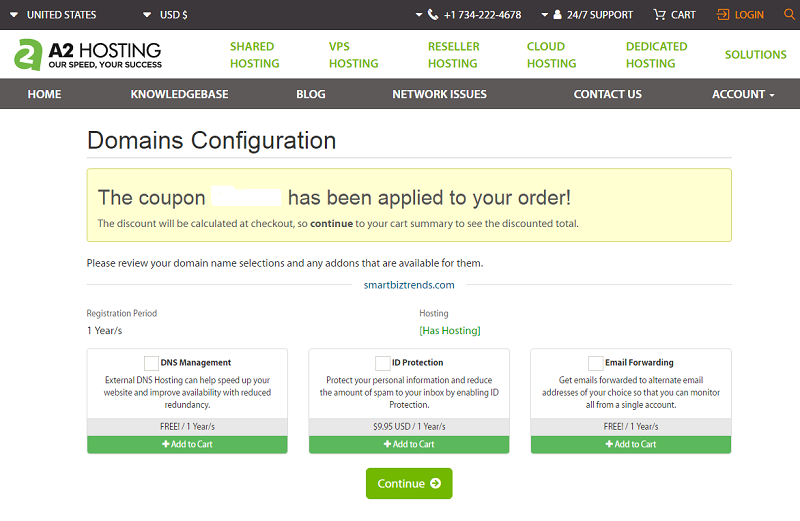
Now, you want to configure your domains, with:
- DNS management (external DNS Hosting can help speed up your website and improve availability with reduced redundancy);
- ID protection (protect your personal information and reduce the amount of spam to your inbox by enabling ID Protection);
- Email Forwarding (get emails forwarded to alternate email addresses of your choice so that you can monitor all from a single account).
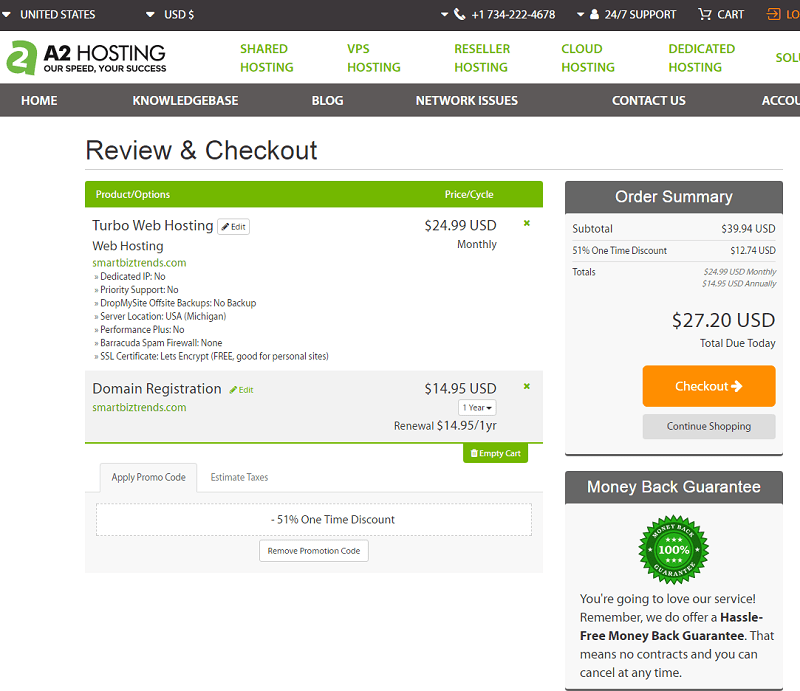
In the last step, you can review your registration order and enter your personal details to create a new account.
Last, proceed to checkout with your favorite payment method:
- PayPal
- bank wire transfer
- Skrill
- check or MO
- 2CheckOut.
Now you can access to your customer dashboard.
A2 Hosting Customer Portal
As an A2 Hosting customer, you can just about find everything you need to manage your account by logging into the Customer Portal account. Just use the email address and password you set when signing up to log in.
Once logged into your A2 Hosting account, click the Services link in the navigation bar to access your Services, including any control panel(s).
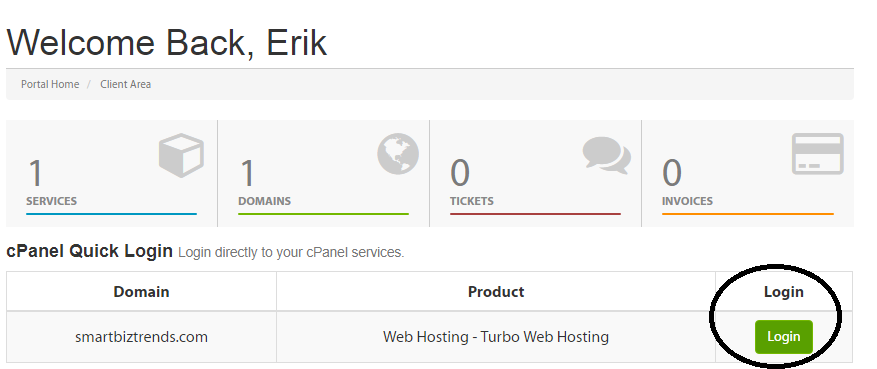
In your A2 Hosting dashboard, you also can:
- access all logins and product details (including cPanel/Plesk, FTP, SSH, IMAP/POP);
- view invoices and billing information;
- add additional products and services (domains, SSL Certificates, etc).
My New Blog with A2 Hosting
To show you how easy is to set up a new blog with A2 Hosting, I proceed to log now in the cPanel of my new registered domain name:
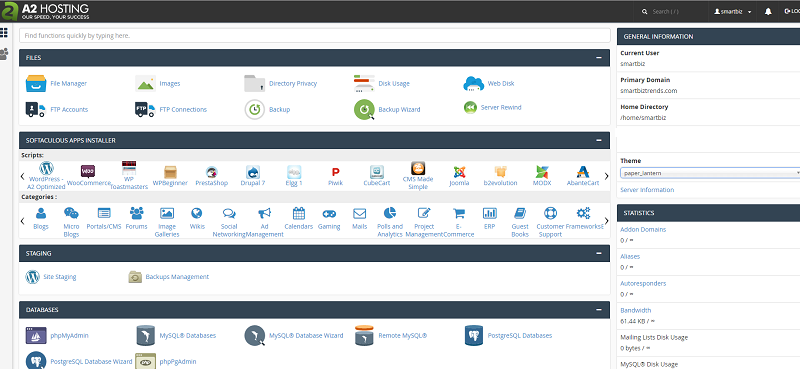
Now, I need to install WordPress.
How easy is this!
I simply click on the WordPress A2 Optimized icon, to be redirected to this page:
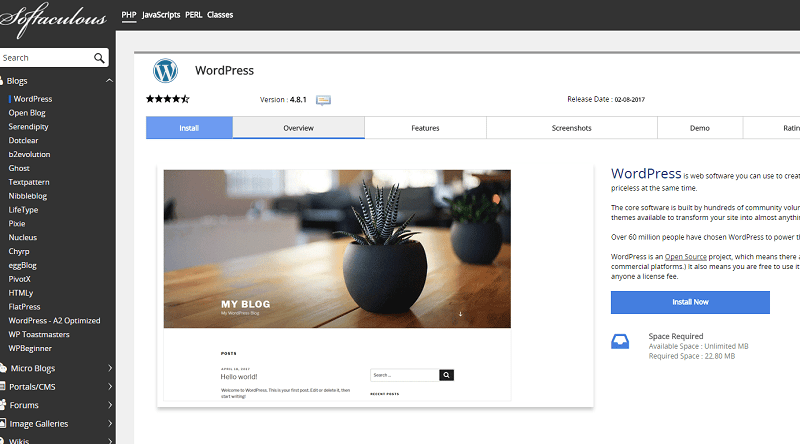
I click on “Install Now” to start the simple WordPress installation process, where I select:
- protocol type (if your site has SSL, then choose the HTTPS protocol);
- choose domain (the domain to install the CMS);
- site name and description;
- admin account settings (username, password and desired email);
- language (most likely English);
- desired plugins;
- advanced options (leave them as default, if you don’t know what they are).
Once ready, I click on “Install”!
After a few seconds, the process is completed:
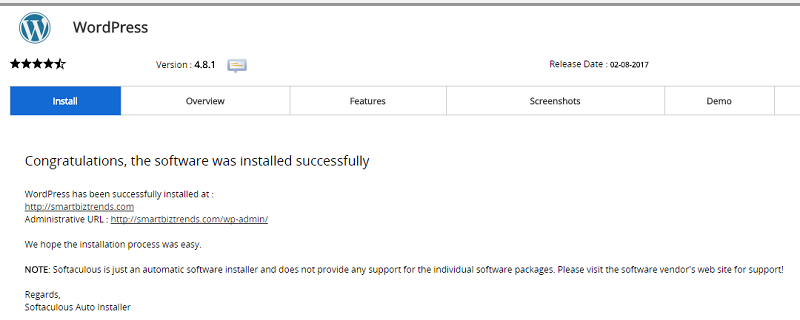
My new blog “Smart Biz Trends” is already online!
Click here to visit it.

Final Words
The loading speed of your website will strongly influence the success of your online business.
Choosing a fast web hosting is indeed really important!
I just made a test to verify the speed of A2 Hosting:
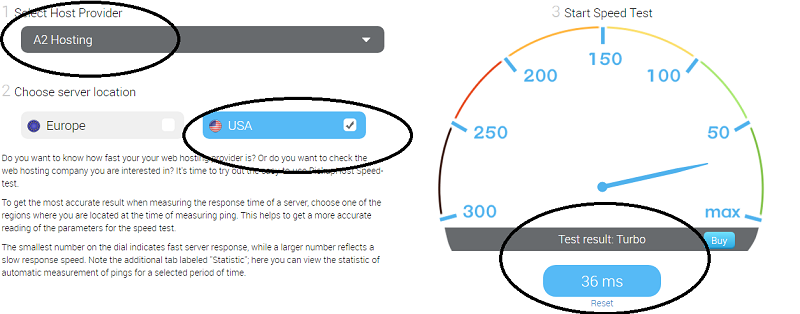
The result was astonishing: 36ms.
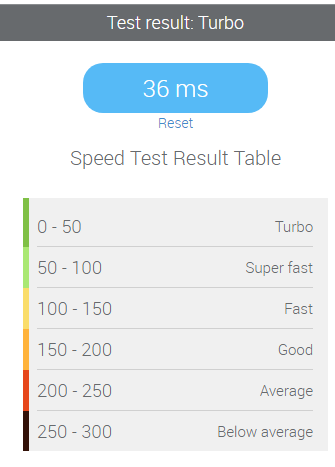
Looking at the following table, you can see how A2 Hosting offers a turbo speed:
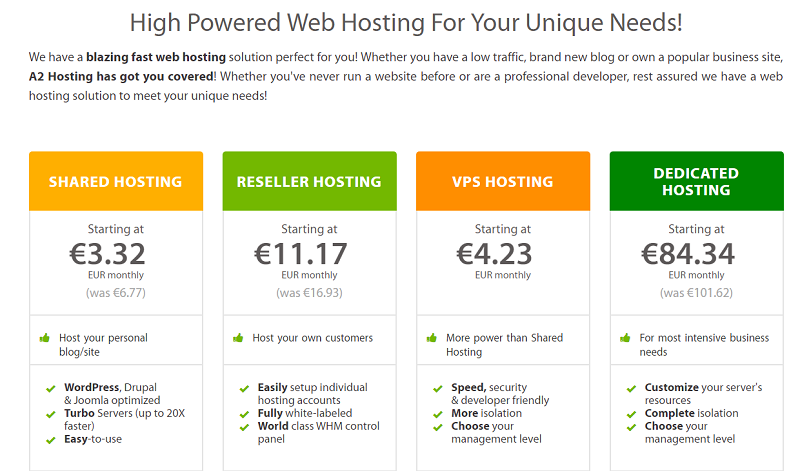
Aside than this very important factor, you will find very competitive prices!
Starting as low as 3,32 euro/month, you can get a shared hosting plan.
Together with a:
- Guru Crew Support: a friendly and knowledgeable support team available 24/7/365 to help;
- Anytime Money Back Guarantee: give a try completely risk free;
- 99.9% Uptime Commitment: A2 Hosting is the host you can depend on with ultra-reliable servers.
You can’t miss to give A2 Hosting a try!
And you?
What web hosting are you using?
Have you ever heard or tried A2 Hosting?
Please share your thoughts and experience in the comments below, thanks!
Wait! Before You Go, Read:
 Hostinger: High-Quality Cheap Web Hosting
 Build Your Online Business With Temok: Domains Registrations and Web Hosting
 000WebHost: Free Web Hosting with PHP, MySQL, Cpanel & No Ads!
 How to Choose a Web Hosting for Your Next Online Project
 Server Hosting 101: Why Choose The PowerEdge R760?
 Things to Remember When Setting Up a Website for an Online Business
 Everything You Need to Know About Cheap Web Hosting
 Online Loan Sri Lanka: 2025 Guide to Fast, Secure Borrowing
 Market Samurai – Review of Great Tool for Online Marketers and SEO Specialists
 Make Your First $100 Online: A Beginner’s Business Toolkit
 Top Reasons Job Seekers Prefer Apna for Fast and Reliable Hiring
 The New Kajabi: Easily Sell Your Content Online
 5 Things To Consider When Choosing A Blogging Platform
 When Law360 Articles Threaten Your Online Business Income
 How Important is Your Online Image as a Business Owner?
 How to Accept Cryptocurrency Payments and Boost Your Online Business
 Fast Payouts and Big Wins: Best Crypto Casinos of 2025
 5 Things No One Tells You about Running an Online Business
 Optimize Your Online Store with Top 11 WooCommerce Plugins
 How Google Chrome 62 Can Affect Your SEO and Online Business
 How Offering Express Delivery Increases Online Cart Value
 5 Steps to Create and Sell an Online Course
 How to Make Money as a Food Blogger
 3 Content Strategies Your Business Needs To Thrive Online
 Learn About DDoS Attacks and How to Protect Your Online Business



12 responses to “A2 Hosting: a Fast Web Hosting for Your Online Business”
Hi Erik,
What an amazing review, well featured all providing with screenshots.
Pvarieldotcom also is using this amazing hosting platform after an awkward experience with blue host.
Indeed A2 Hosting speed is amazing to note.
Thanks for sharing.
Have a wonderful weekend.
~ Phil
Hello
Erik,
Glad to read your post. Happy to know about A2 Hosting and its amazing features. A web hosting service should be assistance, reliability, easy of use, worpress, unlimited, economic, warranty and values.
I have read this whole post and amazed to know its features. Great to know its speed and I am going to use it.
Thanks for sharing.
Best wishes,
Praveen verma
Hello Erik,
Excellent one over here 🙂
A2 hosting looks very promising and looks like they are offering one of the blazing speed among the crowd.
The screen shots from your side is clearly defining what A2 hosting can bring with them.
Its matter a lot to choose a best hosting services so that the services could satisfy both, the owner and the customers.
Thanks for the share.
Shantanu.
Hi Erik,
Great review of A2 Hosting. Loading speed, uptime, and support is the main factor we should consider before choosing a web host. A2 Hosting looks promising!
Thanks for sharing, Have a great day!
Hello Erik,
I am already using A2 Hosting. Really this is a classic hosting service in the world. And thanks to you for your nice review.
Hi Erik
What a joy to be here again.
I am so glad to say that you have been mentioned in my latest post on A2 Hosting review.
Thanks again for sharing your valuable experiences about A2 Hosting
Have a wonderful and profitable week ahead.
Best Regards
~ Phil
I’m glad that the dedicated IP’s have the option for Barracuda SPAM firewall. This will not only make everything faster by clearing out junk, but it will also keep out unwanted solicitors. I’ll have to consider this type of web hosting.
Hi Erik,
Excellent Review about A2 Hosting, I am using other hosting for my micro niche website, Sometimes suddenly showing that 404 Error page.
So I am losing my organic website traffic. Now I am planning to move to A2 hosting.
Thanks for a detailed and excellent article Erik,
Hi Erik,
Thanks for such a wonderful article, It’s having a clean and clear outlook for reading, and it’s a very excellent guide. Your image examples are better for people who start a blog.
Keep posting like this way. Waiting for your future article Erik.
Erik,
Thank you for a Wonderful Article. Really knowledge sharing with Screenshots.
Hey Erik,
I saw your article it’s amazing but I have one doubt about it while creating a new account in A2 hosting we didn’t do any work at the back end? because while I am creating my account some errors occur in it. Please clear this. doubt by the way thank you.
Hey Erik,
I have used Hostgator for my business since I have not used A2 hosting. But after seeing this I get some idea about A2 hosting cost vise this is better than Hostgator. But I don’t performance vise once I used then I will tell my suggestion here thank you.