Using the right tools in your blogging journey will definitely influence whether your success or failure.
Have you ever wondered what actions take your visitors when landed on your website, checking exactly which pages they visit, even monitoring their mouse movement?
Well, with Lucky Orange you can get this, plus many other interesting features, like live chat and polling system.
Table of Contents
How to Start Monitoring Your Site With Lucky Orange
Registering is easy and you can run a completely free 7 days trial, without adding your credit card information.
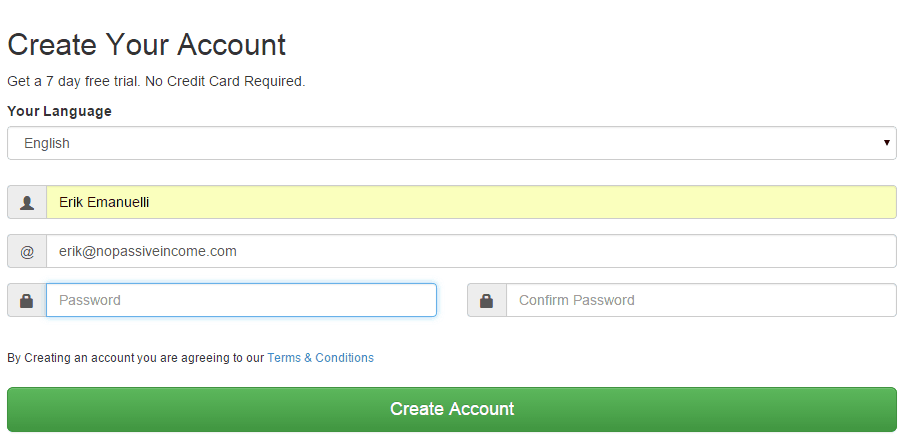
Just add your language, name, email and password to create your account.
Confirm your password and start the guided tour.
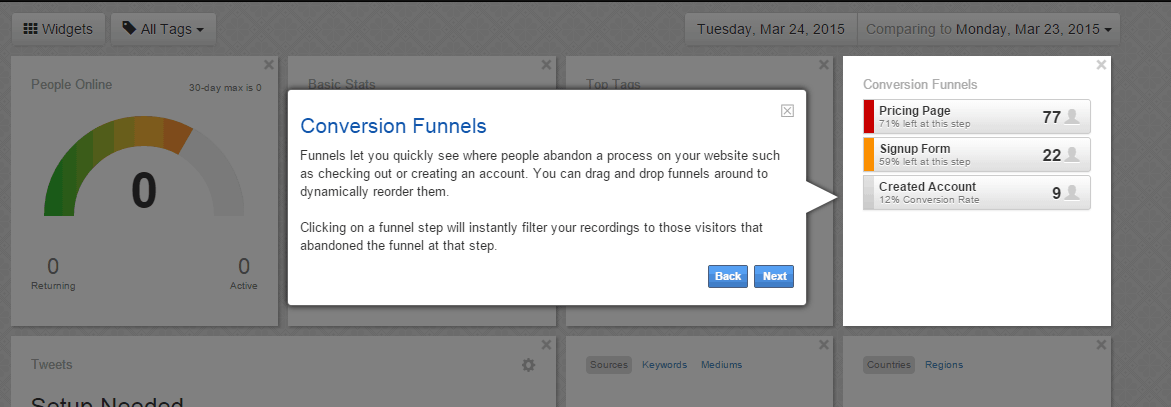
You can personalize your LuckyOrange dashboard depending on your goals.
Likely, you want to leave the standard widgets:
- people online (new, returning and active);
- basic stats (unique visitors, page views, number of visits, average pages per user);
- sources of your visits, keywords of search engines, mediums;
- countries and regions of users;
- tweets of your preferred Twitter account;
- world map of your site visitors;
- language, browser, OS and devices of your users;
- top tags;
- funnels.
The 7 days free account gives you up to 50,000 monthly page views.
Attention! Remember to add your domain name to start monitoring your blog and inserting the script code in every page of your website.
The code is similar to Google Analytics and loads asynchronously (which means it won’t affect your website loading speed).
How Lucky Orange Works
Lucky Orange is a multi-function tool for your site optimization and analysis.
Use it to better understand your audience, tracking mouse movements, user’s behavior and improving conversions.
When the code is installed and the visitors start coming, you can begin monitoring several interesting data.
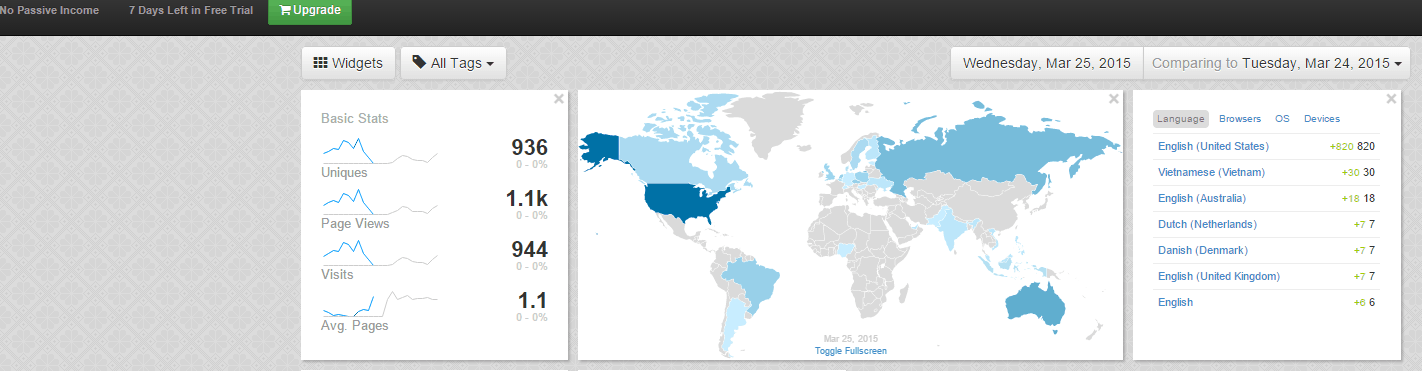
After a few hours of having installed the code, I received already the first details of my visitors.
Just click on the screenshot above to take a look.
Watching where your visitors come from is interesting, but what’s more, is monitoring (even real time) the behavior of your users.
If you take a look at your dashboard menu, you can see:
- live visitors;
- recordings;
- chat;
- heat maps;
- polls;
- form analytics.
Live Visitors
Click on the live visitors tab to enjoy viewing the live activity of your website.

Just choose one of the users in your list, to see him live while he’s visiting your website. You may also ask him to chat (a window will appear on the bottom right), or watch the video of his activity later.
Additional information is displayed like I.P., number of clicks, moves or pages visited, time spent on your site, source, location, and browser/device used.
Recordings
The second tab of the menu you can use is the “recordings“.
Now take a look at this screenshot:

What you can do is label every user with a tag, to better monitor every of your goal campaign.
The first user you see is me, the second a visitor from Mumbai (India), landed from a direct link, who visited 3 pages and left one comment.
The third visitor is from Dhaka, read an article and then converted to my page “How to Start a Blog”.
The last one in the image is organic traffic, from Google.
I wanted to watch the recording of third visitor, see the screenshot of how it looks and at the exact moment he’s clicking on my conversion page:
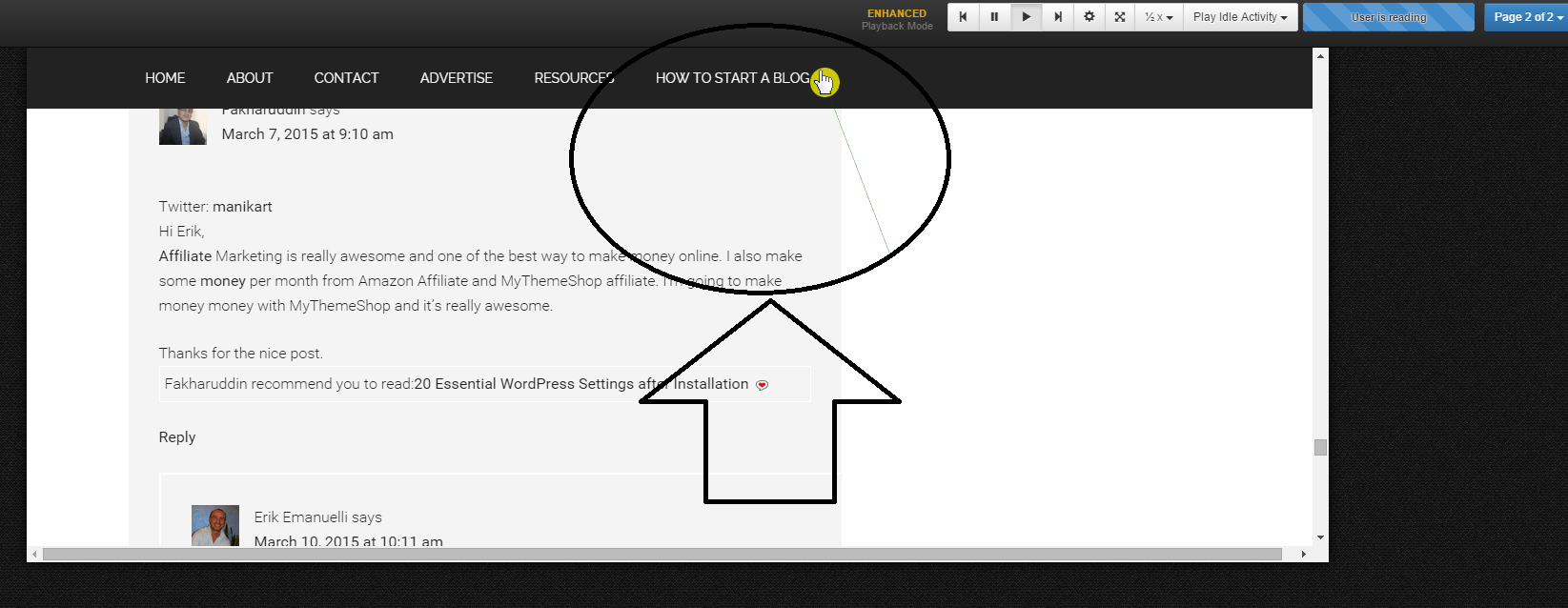
I find the “recordings” feature the most interesting, in my opinion.
Whether is a 30 seconds visit or a few hours spent on your website, LuckyOrange will record all the activity.
You can then enjoy watching your user’s behavior, finding what works and what’s not in your web pages.
As I did, you can filter recordings by tags, like comments, keywords used, conversions, etc.
It’s good to note, that by monitoring how your users scan your website, you can understand what it’s confusing them. And this is where you want to make specific modifications to improve their experience. You can do it over and over, until finding the perfect solution.
Important! You can filter by browser and device used, to view how your visitors behave from mobile.
Do you need to make your website mobile-friendly? Visit this post.

Chat
Another useful tab in the menu is the “chat” system. You can set chat operators on call and available to chat with your users.
This is a great function to help converting visitors into customers.
Just image, a user lands on your website and feel lost. But through the chat help, you can gain a new customer!
Important to know: chat operators have the unique ability to see the visitors screen (without the passing of sensitive data), to better assist him (see the mouse movements, clicks, scrolls, everything in real time).
And it’s possible to chat with multiple users at the same time.
Heatmaps
There are three different heatmaps available: clickmap, mouse movement and scroll depth.
With this feature, you can see at first glance, the “hot” places in your website.
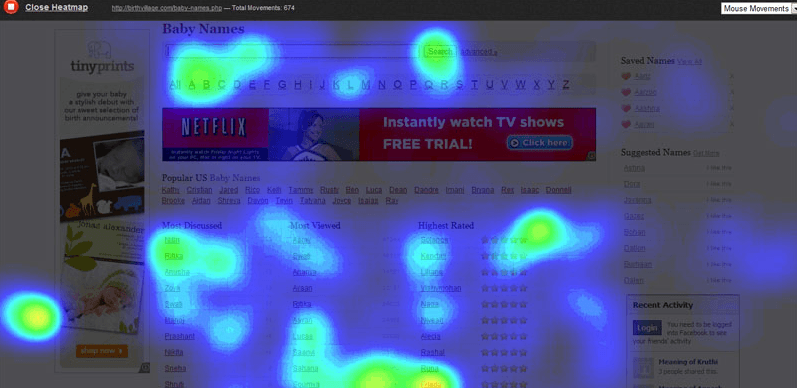
See above an example of “mouse movement” heatmap.
It’s great to discover the hot spots in your pages, and see what are the most clicked elements.
This is an amazing feature to optimize your site!
Polls
With the polling system, you can build real-time polls to gather your visitor feedbacks, comments and tips to improve your business.
It has a clean and simple interface.
The poll will be visualized at the bottom right of your website and you can decide to allow the commenting system. Also, to avoid bothering your visitors, if they close the poll, it will never be displayed again for that session.
You can even decide to target the poll for specific pages or geographical areas, in order to achieve different goals.
The results are real-time, visible from your LuckyOrange dashboard.
Form Analytics
This feature will automatically find any form within your website.
Do you have an email optin?
Or may be, a form to ask a quote?
With form analytics you can get an advanced reporting with many interesting metrics, like the most important “conversion reporting.”
Check abandonment reports, as well as how long for a visitor before filling your forms, or even how much time your users will take to complete them.
Demo Video
You may want to watch the official demo video for more information:
LuckyOrange Pricing
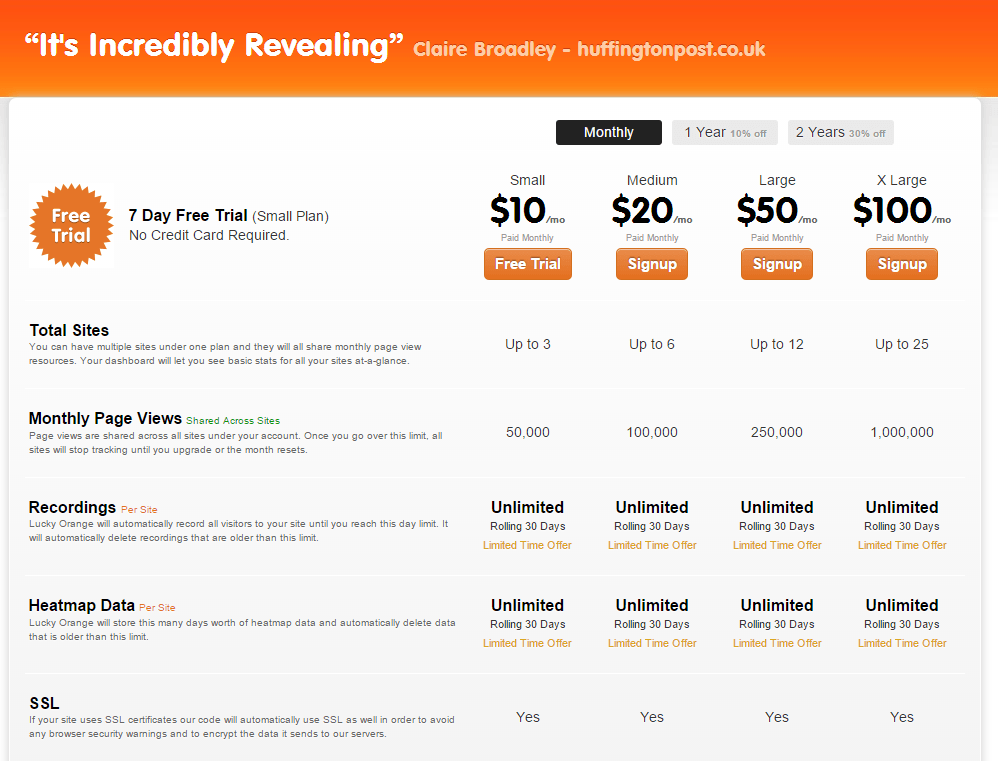
After the 7 days free trial, you can decide to upgrade to one of the monthly packages available.
Just to mention, the small account is only 10$ month (much more convenient than Hotjar, which is $30 a month, or more), and includes up to 3 sites, 50,000 monthly page views, unlimited recordings and heatmap data, SSL, up to 2 chat operators per site with complete chat transcripts.
Conclusion
Whether you need to monitor your visitors behavior, or you want to improve your conversions, LuckyOrange is a must use tool.
With the 7 days free trial, you never nothing to lose, and so much to earn.
During the test on my website, I’ve found this tool very helpful for finding out how NoPassiveIncome visitors are navigating trough the web pages, in order to better understand which modifications take to improve overall usability and improving conversions.
I’m really impressed how easy is to use this website and I love their marketing quote:
“Why go elsewhere? You could spend hundreds of dollars a month on many different services to get the same features packaged with Lucky Orange”.
Have you ever tried this tool?
Are you going to test LuckyOrange on your site?
Please share your views in the comments below, thanks!
Wait! Before You Go, Read:
 Maximize Your Profit with the Help of These Conversion Rate Optimisation Tools
 Spotibo: A New On-Page SEO and Analysis Tool You Need to Use
 Best Landing Page Builder Tool – Unbounce VS GetResponse
 Market Samurai – Review of Great Tool for Online Marketers and SEO Specialists
 Complete Review of the Krikya Platform in Bangladesh
 SMhack: The All in One Social Media Managing Tool
 Top 6 Wix Integrations for Small Business Owners
 Jephi: a Free Time Tracking Tool To Use If You Are a Freelancer
 Smartarget: Improve User Engagement And Sales Without Coding
 How to Use Finteza to Boost Your Website Conversions Analyzing Quality Traffic
 How to Analyze Your Site Traffic and Improve Your Conversions With Ptengine
 Instanavigation: The Ultimate Tool for Viewing Instagram Stories Anonymously
 How to Block a YouTube Channel (The Complete Guide)
 How to Make Money With Infolinks – Best Adsense Alternative
 How to Secure Your WordPress Site Using “Wordfence Security” Plugin (Free)
 5 Free But Fantastic Google Tools Every Serious Content Marketer Should Never Ignore
 How to Get More Leads and Convert Them into Sales With SharpSpring Free CRM
 How I Increased My Adsense CTR by 400% in 3 Weeks with Adngin
 Solopreneur, A Fantastic Theme For Bloggers and Marketers
 Forminator: The Bulletproof WordPress Plugin for Building Any Type of Form
 A Guide to Keyword Targeting and On-Page SEO
 How to Double the Visits to Your Site, Without Doing Internet Marketing!
 Know How Your Website Structure Can Impact Your Business Sales?
 XOVI: All-In-One Marketing Suite (Alternative to SEMRush)
 The 9 Best 404 Plugins for WordPress
Hi Erik,
Informative post indeed 🙂
Never heard of Lucky Orange, and I loved the name! Yes, heatmaps are a great way to find out more about what your readers are liking, clicking, or visiting on your blog.
While a little of it we get to know from our GA also, one doesn’t get all the features mentioned here, like the chat option or the polls, which looks nice. Something that one needs to install additionally if required. Needs to be checked out in detail!
Thanks for sharing this with us. Have a nice week ahead 🙂
Hey Erik,
That’s a really cool program and I like how you showed us how each little section works. I’ve tried a few and found them a little too confusing and although I’m game for using tools that I know will help me, I think some of them are overpriced.
The name really stands out too and I think for a lot of us we’re more visual people. Google Analytics is great but so many people don’t take the time to actually sign in and check things out as much. These tools are great for knowing what people are doing at that moment.
Going to definitely take a test drive so thanks for sharing this new service with us.
Hope you have a fabulous week Erik and thanks again.
~Adrienne
Hey Erik,
I’m actually using this heatmap tool after hotjar
What I love with this alternative is the multitude of features. The chat feature has been great to me as you can see it on my blog.
BTW, I’m writing about it too as I see it to be a wonderful tool that will benefit my audience 😉
Hey Erik,
Great post here and review really.
I just started getting into using heatmaps on my site and I’m amazed at the results it provides. This review of this product is certainly something for me to consider, due to the vast detail it provides.
One thing though, the name sure is catchy … and that’s a great thing.
– Andrew
Been using the product and can affirm it is really interesting.Once detecting who is viewing your website and their location really gives you the power to strengthen your website even further.Invitation to chat too make them feel special
Hi Erik,
This is the first time i hear about lucky orange, Very informative and i am gonna try this out for my blog to get the benefit.., i use Google analytics but waiting to see how this tool is all about..!
Regards
Mukesh
I heard this tool for the 2nd time and review was good to me. I will try it out for myself later. Thank you for sharing it and get my attention to it more.
Oh, Sure i will of course tell you after using this.
I just began getting into utilizing heatmaps on my site and I’m stunned at the outcomes it gives. This audit of this item is positively something for me to consider, because of the boundless subtle element it provides.Thanks for offering this to us. Have a decent week ahead.
Hello Erik,
Seems like Lucky Orange is really superb platform for checking website/blog stats. Well to be honest I’m a great fan of Google Analytics but never tried any premium tool to check blogs stats. Look like I’ll have to try lucky orange trial version once.
Thanks