Internet is full of opportunities and making money online has become the dream of many people.
Blogging is still a very popular way to earn an income, as there are different methods to monetize a website and its traffic.
While Adsense seems to be the most common choice, in this post I want to write about a valid alternative: Infolinks.
Table of Contents
How to Join Infolinks
Registering to Infolinks is very easy.
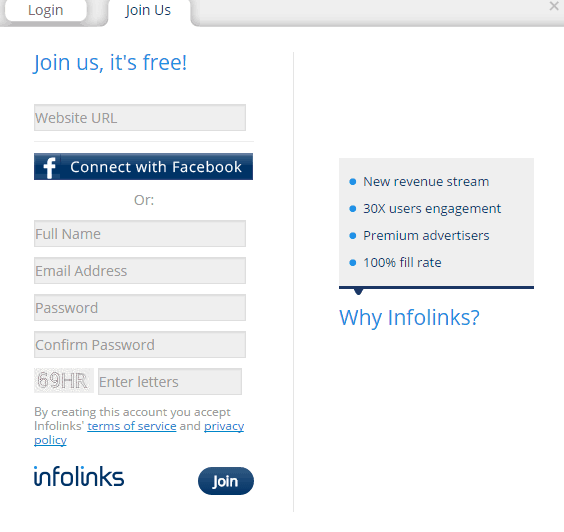
Just visit the website homepage and at top left, click on “Join us”.
After entering your website in the first field, you can simply sign up with your Facebook credentials or add your full name and email.
The application process seems quite fast, as you’ll get notified of your approval within 24-48 hours.
How Infolinks Works
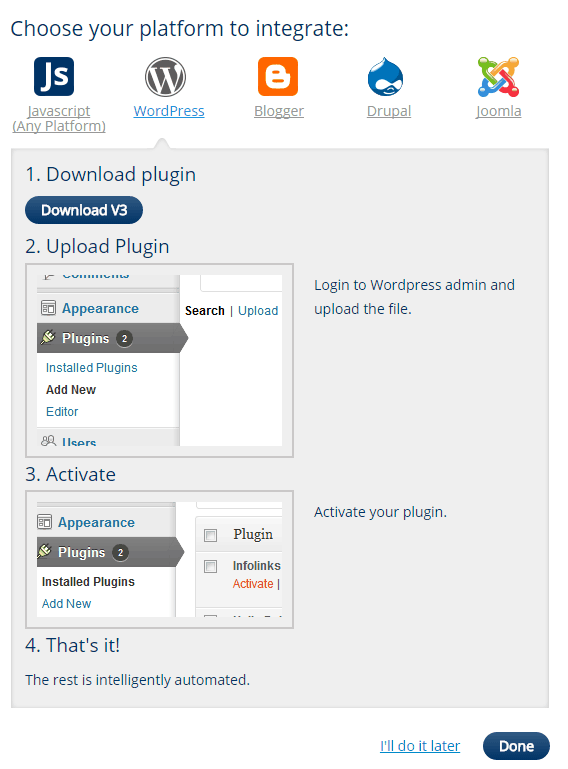
After being accepted, you may choose how to integrate the Infolinks code, depending on the platform you are using.
With WordPress is pretty easy, just download the plugin and activate it.
You don’t have to do anything else, as the plugin will automatically set everything (included your website ID).
As a publisher, you can choose between 4 different ads, to be displayed on your web pages.
They have an original and unique design and they look quite different from Adsense (so, yes, you can use Infolinks and Adsense on the same website).
You can even personalize the ads, depending on your blog theme and colors.
Infold
This ad seems to be the most converting unit.
Infolinks will show a specific ad depending on the keywords in your article or the queries of your organic visitors.
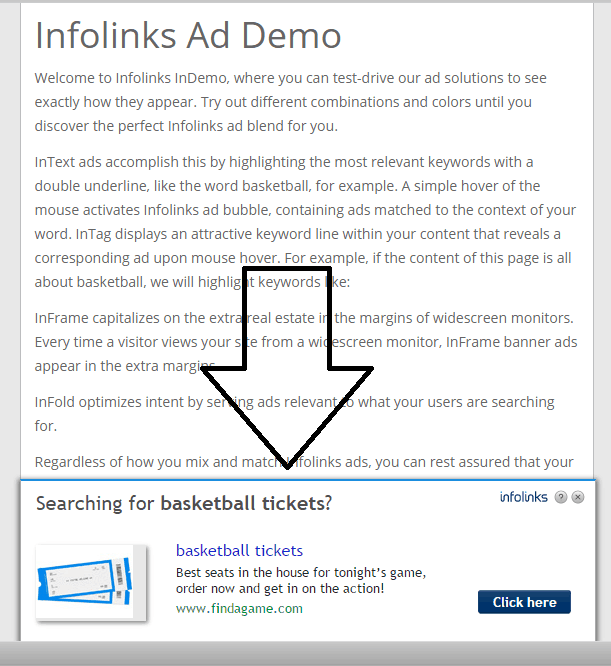
Infold ad will appear at the bottom of your web pages, see:
This ad will likely decrease the bounce rate of your site and is completely unobtrusive.
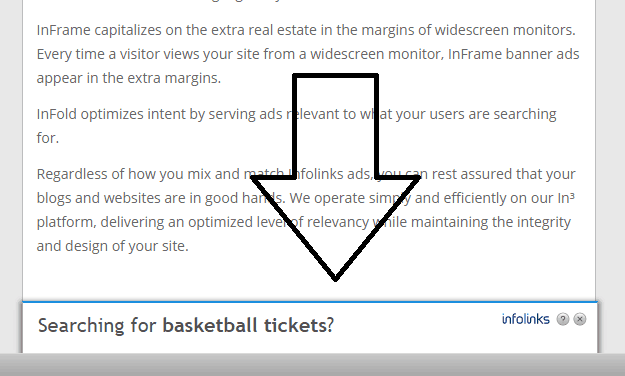
After a few seconds it shows up, it will tuck under the line, almost disappearing.
See:
Intext
This is the most popular choice.
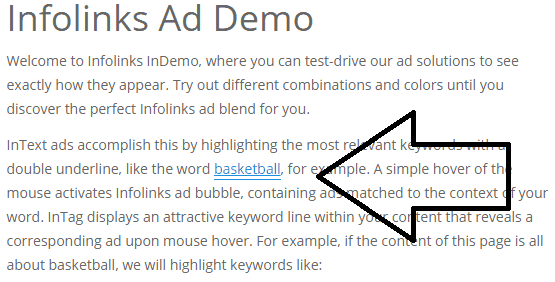
Intext ads will be displayed as hyperlinked text within your content, showing up when users are hovering the mouse over it.
This is how it looks this type of ad when visitors don’t hover the mouse on it:
And this is when the ad will appear:
If the visitor will continue to read your post without clicking on the intext ad, it will disappear.
Note: you can personalize the number of ads in your web pages.
Intag
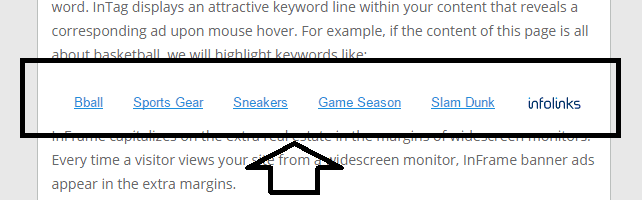
This ad consists of a group of relevant keywords, placed within your content.
See:
This is how it looks when mouse is hovered on some of these keywords:
InTag ads are built with related tags.
You may want to personalize these ads following your site layout and theme (and, of course, colors).
Inframe
The last Infolinks ad format you can use is the “inframe”.
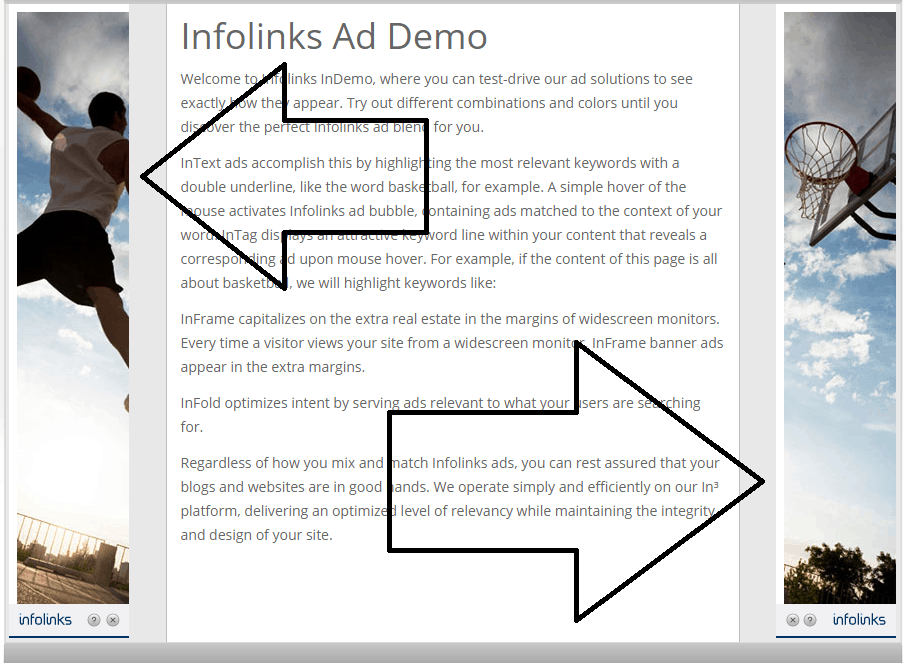
Great for monetizing margins of the screen (perfect for vertical layout sites), it shows banners relevant to your topic.
The system will auto-detect when your users are visiting your web pages with a browser window wider than your site and add banners, which are going to stay there while users are scrolling down.
See a screenshot to have an idea of how it looks like:
Infolinks Video
Check out the latest Infolinks official video, it’s really a good one!
Why You Should Use InfoLinks
Considering that Infolinks may be the perfect monetization solution for niche sites, let’s see some general advantages from using this network on your blogs:
you won’t need to find spaces to insert Infolinks ads if you have already several banners placed on your site;
remember that you can get a good CTR from placing the ads within your content (also be sure to not overdo);
installation is very easy (just download the plugin and activate it);
the fact that you can place Infolinks ads in the same web pages where Adsense already present is a big plus;
it works well also on low traffic sites;
you can personalize the looking of the ads;
application process is quite easy and approval is fast;
quick payments (when you reach $50, you can ask for a PayPal transfer)
Conclusion
Founded in 2007, Infolinks is now used by more than 100K publishers worldwide to monetize their web pages.
I think it can do very well on any topic, but most of all in niche sites.
Tip: do you want to create a new site? You should consider finding high paying keywords. You can make more money then using Adsense and Infolinks.
Whether you are looking for a new way to monetize your blogs or an alternative to the methods you are already using, I suggest to give it a try!
Register today at Infolinks.
What about you?
Have you heard of Infolinks?
Are you using it on your web pages?
Please share your views in the comments below, thanks!
39 responses to “How to Make Money With Infolinks – Best Adsense Alternative”
Hi Erik,
Great review about Infolinks! 🙂
Actually I used to use it, but I stopped using it because I thought it would disturb my readers in reading my content. What do you think about this?
Indeed, when I read this review from you, I am interested to start again. And I hope I can be successful this time. As I recall, the price of every single click is very small. Well, that’s just my thoughts though.
Thanks for this review, Erik.
I will sharing it right now. 🙂
And, it seems I was the first person who commented here this time…hehe 😀
Have a great weekend!
~Nanda
if you need adsense than i can help you . We helped a lot people for getting adsense
just contact me and i am giving you 100% commitment that you will get adsense.
Best Regards
devang
skype:devine.divya
email:devangjob@gmail.com
Whats’app:+919727785205
Hello Erik,
First time landing on your place but I know you from many other blogging sites! And I hope you would have seen me as well somewhere! 🙂
InfloLinks is an awesome and powerful alternative to AdSense, pretty straight-forward, mostly accepts all the requests, and great at support.
I do love them and have used them years ago on one of my blog!
When I am going to try something to monetize, will definitely give InfoLinks a try!
Thanks for the writeup! Gotta share on my social profiles!
See me often! 🙂
~ Adeel Sami
That is a great development.Quite good and useful.I Will be getting to it and use utilize the concept.
Hi Erik,
Thank you for this tutorial, i have been using infolinks for a long time now, it is pretty good i must confess; just that at times the ads mis behaves and tend to make your blog look un-proffessional.
hi Erik
I agree with the suggestion to not maximize the number of links since your viewers can consider your site very spammy. On my site, I just use two but I might increase it to four since I am now writing longer posts
Thanks for this great article!
John Snow
Hi Erik,
Just a heads up through the response you’ve left on my article. Indeed found this article as well as the blog “No Passive Income” really informative. Interestingly though through my first visit I got a great vivid view of it’s user engagement which is really great.
I mostly use Infolinks in my Micro-blogs, blend them with the content and site and get pretty good profits through it. Thanks for the review 🙂
Hi Erik,
Your post is so timely! I just started using Infolinks on both of my sites! Of course, I set them up using the Intext option, but after reading your post I changed one of my sites to Infold to see what kind of difference I may see.
I’m curious as to what your other readers say about Infolinks and if they have made their “millions” yet using it. 🙂
B
Hi Erik,
I agree that Infolinks is a great Adsense alternative but overuse of ads may harm your readership. I started as a publisher in 2010 and the experience was awesome. But, now I’m using mostly on few blogger blogs. Thanks for sharing this article. I’m feeling nostalgic. 🙂
Hi Erik, great to see you writing about Infolinks here. I used to use Infolinks to monetise my first blog many years ago, and my click through rate were far greater than AdSense at the time, but the CPC wasn’t that great. With AdSense I’d get between $1.50 and $3 per click, but with Infolinks I used to get no more than $0.20 or $0.30 per click. I haven’t used it since, I’m wondering if the CPC has improved with Infolinks?
I still use AdSense on my parenting niche site and tech site, but might consider trying Infolinks again if the CPC is better than it used to be. Thanks again for a great write up on this.
Have a great weekend mate – Fabrizio
Hello Erik,
Nice post my friend but I don’t like infolinks as it makes a blog look spam because it can add link anywhere in the text plus the ad comes from down makes the site look even worse.
Moreover, it is a good source of earning and the best alternative of Adsense.
Great post , i am going to use infolinks for my new blog till i get adsense approved. Though it looks like the earnings cannot match adsense earning but it is good to start with infolinks to monitize the site.
Regards
Mukesh
Hi Erik
What a wonderful review about Infolinks. I did read a review on Infolinks from Enstine’s blog and now I see you go deep in your review.
In the past, I have used Infolinks but I stopped because I was very insignificant earning from it. However I see that they have added new features. So maybe I will revisit it again.
Thanks for sharing.
Hi Erik!
Great post. I really do understand how infolinks works now. I am glad it is that easy. I think I will give it a try!
Thanks for sharing, Ilka
I have been reading a lot about publishers that sign up for infolinks and I must commend their recommendation for this program as the perfect alternative for Google adsense. It seems to have more ‘flexible’ signing up requirement compared with adsense.
The features of personalizing the infolinks ads to meet with the design and content of the website is pretty remarkable. The positives outweigh the negatives from this review.
It would be lovely to test out this program and see how the conversion works!
I shared this comment in kingged.com where this post was shared.
Great Article Erik and thanks for sharing. My question is can anyone say what’s the current CPC amount?
I hope I can make money with Infolinks after reading your tips.
Yeah, Sure it gave me some bucks and it worked well for me. And yeah, it is the best alternative of adsense. It will help anyone to make some more bucks from websites/blogs. If you have enough traffic.
Personnaly i dont use Infolinks on my website because i think it annoy visitor.
i will try for my new niche blog
Hello
According to my perspective Infolinks is finest ways to maximize your revenue. It`s really best adsense alternative in terms of monetizing our websites .
Thanks for sharing
Best Regards
Omar Saady
Have tried infolinks a long back on my education blogs and I guess it generated some money but I wasn’t satisfied with the outcome since the CTR was very bad.
I’ll have to use infolinks on other blogs.
Quite informative post Erik. It describes how to set up Infolinks ads briefly. Well navigated post showing necessary information to be needed to earn money by Infolinks.
Thanks a lot to share such information.
-Nitin
yes, I’ve tried it on my client’s site but not so much beneficial. Actually at same number of pageviews adsense earnings are comparably more.
just another query for you Erik, actually I’m also using same theme but unable to create Home page, as whenever I try to create such page, it comes with “mydomain.com/home”. But I want the url of home page as you have. Need your help.
Your primary nav menu is showing a Page named “Home”. How you pointed that link to your site homepage ?
Thanks a lot Erik,
Its working fine now as I want. You solved an important issue of mine.
Thanks again for such support.
That was well put. I have heard about infolinks in the past but never read an article that explained it so well. I have a question though. When is the best time to add ads like infolinks on a particular site, like say after how much traffic do you need daily to start monetizing?
One of the in-depth reviews I have read so far. As you have pointed out, there definitely lot of advantages having infolinks under a blogger’s belt. Diversification for income is key.
One question though. You said infolinks is good also for low traffic sites. But without having enough visitor, will it make any money?
Cheers for an awesome post and keep creating great content!
Joydeep
Hey Erik,
I feel that your blog is tons worth of information, Now its time for me to make some money from infolinks. I don’t know about the plugin which is already avaliable in wordpress, which really makes ease for all start up bloggers to avail it. Thanks Erik for once again sharing your stuff here
Happy weekend,
Siva
Hi Erik,
Nice post on infolink i’ve seen these on many website, it’s nice to see that you have a whole tutorial over how to have it on your WordPress website.
I’ve also heard about vigilink, i think you should check that too and write a tutorial on how to get it on your website.
Infolinks is a great alternative of Google Adsense. I’ve been using Infolinks for more than 4 months and it has generated me a very good earnings when my Adsense account got banned. Thanks for sharing
“I’ve just decided to take ads off my site for now.
I had adsense and clickbank banners but wasn’t making enough money from them to warrant having them there.
When I get more traffic I may consider putting them back but for now they’re gone.
I wasn’t familiar with Qadabara but it sounds like a good solution for everyone, not just for those who have high amounts of traffic.”
my adsense account is not approved and i also don’t know the reason behind that. but due to this post i try chitika. this is very good adsense alternatives.
Great article. Before reading this i was confused whether to use it or not. Still have one question arises here in my mind. How many links per page should we use?
Thanks.
really nice review, i just started using infolink,i hope it work best for me
Hey Erik,
Great Review, but I have few questions in my mind after reading this.
I want to know, whether Infolinks is good for small blogs or sites having visitors around 4-5k monthly?
Will it work converting those visitors into some secondary income or I am also thinking about using CPA network?
Which should I use for best secondary income? CPA or InfoLinks?
Hi Erik,
I am surprised to read the review of infolinks on your page.
I too used this years back and faced a lot of inconveniences especially from my readers and at once i disconnected it from my page, after some time I read another attracting and well written review like this and I opted it for again but unfortunately they rejected my request reason only known to them and I left that there as I am well satisfied with my Adsense account. Another thing is that I am afraid will this clash with the Adsense account if one implement this.
Anyways, thanks for the well written review.
Keep sharing
Have a great time of sharing ahead,
Best
~ Phil
Whoooaaaaa….!!! I idnt know Infolink is such an aesome method to make money….
Thanks for this quality stuff mate … and let me try this..
will let you know the results surely
The post is quiet impressive and also thanks for the video I would utilize this ides and implement in my project.



 How I Increased My Adsense CTR by 400% in 3 Weeks with Adngin
 Make Money Blogging – Is it Really Possible?
 teliad (Now SeedingUp): a Great Platform You Should Use to Make Money Blogging
 XOVI: All-In-One Marketing Suite (Alternative to SEMRush)
 How to Earn Money Online with Niche Sites – 10 Crucial and Current Tips to Beat Your Competition
 How to Find Advertisers and Sell Banners on Your Blog – 7 Tips to Make Money Online
 How to Make Money With Propeller Ads
 E-Mail Marketing (And More) with SendinBlue : a New MailChimp Alternative
 Retirement and Making Money After Work
 TrendBrew – Curated Social Commerce Network to Brew Trends and Make Money!
 Beyond eBay: Top 9 Alternative Sites for E-Commerce Success
 Online Passive Income – 5 Money Making Ideas for Bloggers
 How to Make Money By Selling Art Online
 How to REALLY Make Money with Sponsored Posts
 How to Make Money With Affiliate Marketing – A 7 Minute Guide
 How to Make Money on Facebook: Practical Ideas That Actually Work
 The Best & Easiest Ways To Make Money Online
 Top 20 Websites to Find Freelance Jobs and Make Extra Money
 5 Ways To Earn Extra Money Online
 Making Money Online – Benefiting From the Fallen Pound
 4 Effective Ways to Monetize Your Blog
 Making Money from Social Trading – Here’s How to Get Started
 13 Ways to Make Money Online
 Top 5 Little-Known Reasons Why Your Blog Will Never Make You Money (How To Fix It)
 How to Create Landing Pages that Make Money



39 responses to “How to Make Money With Infolinks – Best Adsense Alternative”
Hi Erik,
Great review about Infolinks! 🙂
Actually I used to use it, but I stopped using it because I thought it would disturb my readers in reading my content. What do you think about this?
Indeed, when I read this review from you, I am interested to start again. And I hope I can be successful this time. As I recall, the price of every single click is very small. Well, that’s just my thoughts though.
Thanks for this review, Erik.
I will sharing it right now. 🙂
And, it seems I was the first person who commented here this time…hehe 😀
Have a great weekend!
~Nanda
if you need adsense than i can help you . We helped a lot people for getting adsense
just contact me and i am giving you 100% commitment that you will get adsense.
Best Regards
devang
skype:devine.divya
email:devangjob@gmail.com
Whats’app:+919727785205
Hello Erik,
First time landing on your place but I know you from many other blogging sites! And I hope you would have seen me as well somewhere! 🙂
InfloLinks is an awesome and powerful alternative to AdSense, pretty straight-forward, mostly accepts all the requests, and great at support.
I do love them and have used them years ago on one of my blog!
When I am going to try something to monetize, will definitely give InfoLinks a try!
Thanks for the writeup! Gotta share on my social profiles!
See me often! 🙂
~ Adeel Sami
That is a great development.Quite good and useful.I Will be getting to it and use utilize the concept.
Hi Erik,
Thank you for this tutorial, i have been using infolinks for a long time now, it is pretty good i must confess; just that at times the ads mis behaves and tend to make your blog look un-proffessional.
hi Erik
I agree with the suggestion to not maximize the number of links since your viewers can consider your site very spammy. On my site, I just use two but I might increase it to four since I am now writing longer posts
Thanks for this great article!
John Snow
Hi Erik,
Just a heads up through the response you’ve left on my article. Indeed found this article as well as the blog “No Passive Income” really informative. Interestingly though through my first visit I got a great vivid view of it’s user engagement which is really great.
I mostly use Infolinks in my Micro-blogs, blend them with the content and site and get pretty good profits through it. Thanks for the review 🙂
Hi Erik,
Your post is so timely! I just started using Infolinks on both of my sites! Of course, I set them up using the Intext option, but after reading your post I changed one of my sites to Infold to see what kind of difference I may see.
I’m curious as to what your other readers say about Infolinks and if they have made their “millions” yet using it. 🙂
B
Hi Erik,
I agree that Infolinks is a great Adsense alternative but overuse of ads may harm your readership. I started as a publisher in 2010 and the experience was awesome. But, now I’m using mostly on few blogger blogs. Thanks for sharing this article. I’m feeling nostalgic. 🙂
Hi Erik, great to see you writing about Infolinks here. I used to use Infolinks to monetise my first blog many years ago, and my click through rate were far greater than AdSense at the time, but the CPC wasn’t that great. With AdSense I’d get between $1.50 and $3 per click, but with Infolinks I used to get no more than $0.20 or $0.30 per click. I haven’t used it since, I’m wondering if the CPC has improved with Infolinks?
I still use AdSense on my parenting niche site and tech site, but might consider trying Infolinks again if the CPC is better than it used to be. Thanks again for a great write up on this.
Have a great weekend mate – Fabrizio
Hello Erik,
Nice post my friend but I don’t like infolinks as it makes a blog look spam because it can add link anywhere in the text plus the ad comes from down makes the site look even worse.
Moreover, it is a good source of earning and the best alternative of Adsense.
Great post , i am going to use infolinks for my new blog till i get adsense approved. Though it looks like the earnings cannot match adsense earning but it is good to start with infolinks to monitize the site.
Regards
Mukesh
Hi Erik
What a wonderful review about Infolinks. I did read a review on Infolinks from Enstine’s blog and now I see you go deep in your review.
In the past, I have used Infolinks but I stopped because I was very insignificant earning from it. However I see that they have added new features. So maybe I will revisit it again.
Thanks for sharing.
Hi Erik!
Great post. I really do understand how infolinks works now. I am glad it is that easy. I think I will give it a try!
Thanks for sharing, Ilka
I have been reading a lot about publishers that sign up for infolinks and I must commend their recommendation for this program as the perfect alternative for Google adsense. It seems to have more ‘flexible’ signing up requirement compared with adsense.
The features of personalizing the infolinks ads to meet with the design and content of the website is pretty remarkable. The positives outweigh the negatives from this review.
It would be lovely to test out this program and see how the conversion works!
I shared this comment in kingged.com where this post was shared.
Great Article Erik and thanks for sharing. My question is can anyone say what’s the current CPC amount?
I hope I can make money with Infolinks after reading your tips.
Yeah, Sure it gave me some bucks and it worked well for me. And yeah, it is the best alternative of adsense. It will help anyone to make some more bucks from websites/blogs. If you have enough traffic.
Personnaly i dont use Infolinks on my website because i think it annoy visitor.
i will try for my new niche blog
Hello
According to my perspective Infolinks is finest ways to maximize your revenue. It`s really best adsense alternative in terms of monetizing our websites .
Thanks for sharing
Best Regards
Omar Saady
Have tried infolinks a long back on my education blogs and I guess it generated some money but I wasn’t satisfied with the outcome since the CTR was very bad.
I’ll have to use infolinks on other blogs.
Quite informative post Erik. It describes how to set up Infolinks ads briefly. Well navigated post showing necessary information to be needed to earn money by Infolinks.
Thanks a lot to share such information.
-Nitin
yes, I’ve tried it on my client’s site but not so much beneficial. Actually at same number of pageviews adsense earnings are comparably more.
just another query for you Erik, actually I’m also using same theme but unable to create Home page, as whenever I try to create such page, it comes with “mydomain.com/home”. But I want the url of home page as you have. Need your help.
Your primary nav menu is showing a Page named “Home”. How you pointed that link to your site homepage ?
Thanks a lot Erik,
Its working fine now as I want. You solved an important issue of mine.
Thanks again for such support.
That was well put. I have heard about infolinks in the past but never read an article that explained it so well. I have a question though. When is the best time to add ads like infolinks on a particular site, like say after how much traffic do you need daily to start monetizing?
One of the in-depth reviews I have read so far. As you have pointed out, there definitely lot of advantages having infolinks under a blogger’s belt. Diversification for income is key.
One question though. You said infolinks is good also for low traffic sites. But without having enough visitor, will it make any money?
Cheers for an awesome post and keep creating great content!
Joydeep
Hey Erik,
I feel that your blog is tons worth of information, Now its time for me to make some money from infolinks. I don’t know about the plugin which is already avaliable in wordpress, which really makes ease for all start up bloggers to avail it. Thanks Erik for once again sharing your stuff here
Happy weekend,
Siva
Hi Erik,
Nice post on infolink i’ve seen these on many website, it’s nice to see that you have a whole tutorial over how to have it on your WordPress website.
I’ve also heard about vigilink, i think you should check that too and write a tutorial on how to get it on your website.
Infolinks is a great alternative of Google Adsense. I’ve been using Infolinks for more than 4 months and it has generated me a very good earnings when my Adsense account got banned. Thanks for sharing
“I’ve just decided to take ads off my site for now.
I had adsense and clickbank banners but wasn’t making enough money from them to warrant having them there.
When I get more traffic I may consider putting them back but for now they’re gone.
I wasn’t familiar with Qadabara but it sounds like a good solution for everyone, not just for those who have high amounts of traffic.”
my adsense account is not approved and i also don’t know the reason behind that. but due to this post i try chitika. this is very good adsense alternatives.
Great article. Before reading this i was confused whether to use it or not. Still have one question arises here in my mind. How many links per page should we use?
Thanks.
really nice review, i just started using infolink,i hope it work best for me
Hey Erik,
Great Review, but I have few questions in my mind after reading this.
I want to know, whether Infolinks is good for small blogs or sites having visitors around 4-5k monthly?
Will it work converting those visitors into some secondary income or I am also thinking about using CPA network?
Which should I use for best secondary income? CPA or InfoLinks?
Hi Erik,
I am surprised to read the review of infolinks on your page.
I too used this years back and faced a lot of inconveniences especially from my readers and at once i disconnected it from my page, after some time I read another attracting and well written review like this and I opted it for again but unfortunately they rejected my request reason only known to them and I left that there as I am well satisfied with my Adsense account. Another thing is that I am afraid will this clash with the Adsense account if one implement this.
Anyways, thanks for the well written review.
Keep sharing
Have a great time of sharing ahead,
Best
~ Phil
Whoooaaaaa….!!! I idnt know Infolink is such an aesome method to make money….
Thanks for this quality stuff mate … and let me try this..
will let you know the results surely
The post is quiet impressive and also thanks for the video I would utilize this ides and implement in my project.