LinkedIn has recently announced its growth, touching the 810 million users in more than 200 countries and geographical areas.
With nine million connected companies, ten million active workers and an average of one hundred thousand articles published every week, this is definitely a place where you can build and market your online presence.
If you want to leverage the power of LinkedIn, here are nine essential tips to use this social network to the fullest.
Table of Contents
1. Customize Your URL
Customizing your profile URL helps you look more professional. Also, it will be easier to share and will not be dispersed among the thousands of profiles that contain simple numbers.
Doing this is very simple. You just need to enter the profile settings and click on “Edit profile URL”:
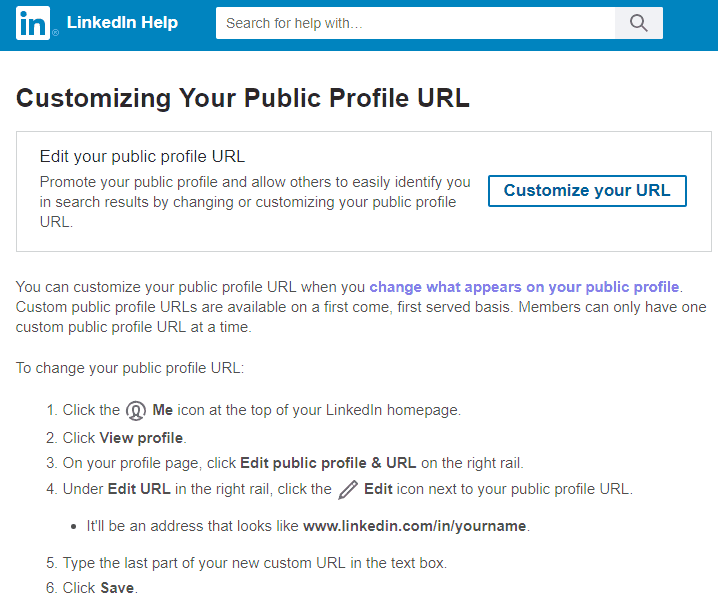
In this way, you can insert name and surname instead of the string of numbers, making it more personalized and palatable. This little trick will allow you to show how careful you are with personal branding.
2. Enter The Link Of Your Website
Instead of the predicted field in the contact list, use the Portfolio section.
You can add different jobs, links and descriptions, to create an attractive profile for your contacts.
Make sure you include all those jobs that really made the difference and that completely represent your business profile.
3. Add a Relevant Cover Image
Using a proper cover image that is relevant to your niche will help your profile visitors identify what you do, at first glance.
If you own a company, you can use a graphic designer to create a cover image that is the same for all your employees. In this way, the concept of belonging to a community will be strengthened.
If you are a freelancer, you create a customized image that lets people understand who you are and what you do, at the first sight.
4. Work on SEO

Did you know that Google indexes LinkedIn profiles according to the SEO rules?
When you are filling out your profile, make sure you use the keywords that best represent you professionally in the headline, in the summary and, again, in the description of your work experience.
5. Leverage Groups
Groups are useful to make themselves known by posting interesting content.
All users in the same group can use direct messages to communicate with each other, up to 15 per month and per member of each group they belong to. You can leverage this feature to send personalized messages in order to improve your personal branding and amplify your professional network.
Did you write any content that you consider particularly useful for a specific group? Take advantage of this functionality and share it with members, obviously without spam.
6. Use Mentions
If you want a particular status or content to be viewed by a specific company or user, you can use the mention function (which is the equivalent of the Facebook tag).
This does not mean that at every update you can tag 30 people to show your new article. Instead, use this feature carefully, because the step to becoming a professional spammer is short.
7. Take Advantage of the Pulse Function
As already mentioned, LinkedIn indexed profiles based on the keywords used. If you do not have a blog where you can write authoritative and useful articles related to your sector, you can use the Pulse feature (think of it as the LinkedIn news section).
The final effect is equal to a real article. You can use a cover image, insert the title, the H2 and the quotes. Also, you can add links on certain keywords, embed images and Youtube videos, making it very similar to a real blog post.
8. Ask for Recommendations
Self-praise can be counterproductive, but if the compliments come from another person they are more credible.
The recommendations should highlight the salient aspects of your professionalism, but also those of your personality and soft skills, such as the ability to problem-solving or teamwork.
9. Fill Up the “Accomplishments” Section
In this section, you can add the training courses you completed, or the most important projects you have accomplished during your career (e.g. development of the company website). You can also enter the languages spoken (without cheating) and if you have received any prize or recognition.
The more detailed information you will be able to enter in this section, the more your profile will appear complete and professional.
Bonus Tip
One last tip: if you do volunteer work, enter it in the Volunteer Experience & Causes section. Showing yourself as a socially engaged person could give you some more points during the selection process.
LinkedIn is an important tool for personal branding, so be sure to follow the above-mentioned steps and leverage its full marketing power! For even better results, consider using tools like Carousify.com for creating and scheduling LinkedIn carousels, which have shown remarkable engagement rates on the platform.
Wait! Before You Go, Read:
 The Effectiveness Of Sending Mass Email Through Linkedin
 How to Write an Effective Twitter Bio : 7 Essential Ingredients to Use
 Services With Virtual Numbers For Creating A Linkedin Account
 Essential Ways to Get Your SEO Right from the Beginning
 7 Essential Rules For Creating a Killer Business Logo
 3 Essential Elements of Successful Pay-Per-Click Ad Campaigns
 Tips for Using Google Analytics Effectively
 Crafting the Perfect Volunteer Survey: Essential Questions to Ask
 11 Tips for Getting the Most Out of Pinterest
 12 Tips to Optimize Your Conversion Rate
 How to Write an Article – Writing Tips from a Professional Writer
 How to Rank a Blog Post on Google: Tips and Tricks!
 15 Essential Customer Success Metrics for SaaS Companies
 Best Tips for PTE Reading Multiple Choice Multiple Answers
Essential Ways To Save Money As An Ecommerce Business
Best Tips for PTE Reading Multiple Choice Multiple Answers
Essential Ways To Save Money As An Ecommerce Business
 9 Tested and Proven Tips To Becoming An Expert Proofreader
 Why a Proper Property Title Search is Essential for Secure Home Buying and Investment Success
 UGMA Account Limits and Taxes : An Essential Guide for Parents and Financial Planners
 Killer Tips for Constant Daily Facebook Likes -Get More Fans
 How to Find Advertisers and Sell Banners on Your Blog – 7 Tips to Make Money Online
 Get Paid to Write at HireWriters (Or Order Quality Original Content)
 10 Financial Tips For Older Than 60 Years
 Tips For Combining SEO & Content Marketing
 How to Enhance Your Facebook Timeline Page With Images
 Dropbox Hidden Features: 6 Tips to Unlock Its Power


5 responses to “9 Essential Tips to Use LinkedIn to The Fullest”
Excellent tips Erik. I have been active on LinkedIn over the past few weeks. Things picked up when I began Liking and commenting genuinely on other folk’s updates.
Ryan
Hi Erik great post. I like posting on groups and providing good information. I don’t spam, I just provide helpful information, and allow people to view my profile where my profile page gives them more information about me. With the additional tips provided in this post, I should see things improve for me with my Linkedin marketing.
Hi Erik amazing post. I am facing a lot of problem to edit my profile url. I am using linkedin on android phone. Please tell me how to edit profile url on android phone.
I’ve been inactive on LinkedIn and other social media accounts. But I agree that LinkedIn is rapidly growing and a good place for businesses and marketers; Seeing a lot of elite people using it to share their insights.
Thanks for sharing, Erik!
Hello Erick,
I greatly appreciated your interesting article on Tips to Use LinkedIn to The Fullest.
I agree that LinkedIn is rapidly growing and a good place for businesses and marketers; Seeing a lot of elite people using it to share their insights.