Do you need an Under Construction Page or a Coming Soon Page or a Maintenance Mode Page while you’re working on your site?
Then you landed the right place.
In this post, I’m going to introduce you Under Construction, a free WordPress plugin that helps you exactly with that.
Table of Contents
How it Works
If you are serious about blogging or building an online business, then you should know that any time your site is offline, you may lose potential readers, customers or fans.
And when you work on your site, there’s anything that can go wrong and potentially harm your website. For this reason, it’s important you proceed to backup, before start to making any changes to your blog.
So, whether you need to update the design of your site or simply need to refine a layout, here’s a simple, no-nonsense plugin for all those situations when you have to hide the site behind an Under Construction page for a while.
The following are the main options of this plugin:
- Under construction mode – off / on
- End date & time – automatically disable construction mode on a set date
- Google Analytics Tracking ID – enable tracking via Google Analytics
- Theme – a new one is added with each update, see screenshots of available themes
- Custom CSS – adjust any part of the page to fit your needs
- Title – page title, for SEO
- Description – page description, for SEO
- Headline – main headline/title
- Content – anything you need to display, from styled text to images
- Login Button – show a descrete link to the login form, or WP admin if you’re logged in
- Social icons/links – new ones are added with every update; let us know if we missed your favorite ones
- Google+
- YouTube
- Dribble
- Behance
- Phone
- Skype
- Tumblr
- Whitelisted User Roles – user roles who see the site, instead of maintenance page
- Whitelisted Users – users who see the site, instead of maintenance page
Here’s a funny introductory video:
How to Install Under Construction WP Plugin
For the installation of this plugin, simply follow the usual routine:
- Open your WordPress admin dashboard, go to Plugins, click Add New
- Enter “under construction page” in search and hit Enter
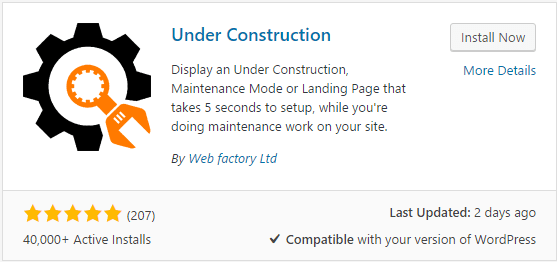
- Plugin will show up as the first on the list, click “Install Now“
- Activate & open plugin’s settings page located under the Settings menu
In alternative, you can directly download the plugin for free in the WordPress.org page.
Note: the plugin is updated twice per month and they are currently working on non-WP version as well.
Under Construction Plugin Menu
Find the plugin menu, under Settings in your WP dashboard.
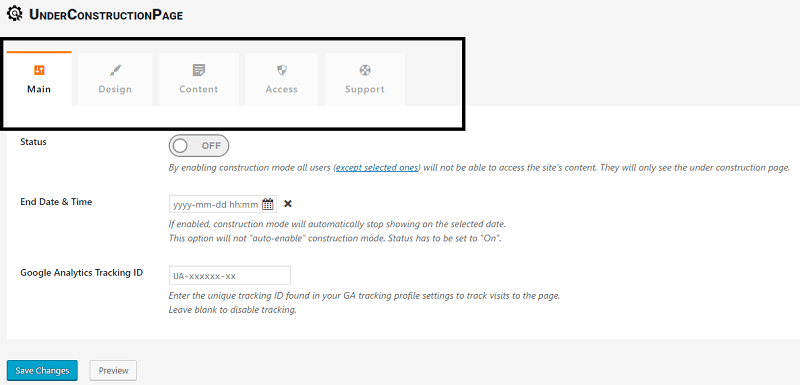
Here you can manage the functions.
In the Main tab, you can turn on/off the plugin, enabling construction mode for all users (with an option to exclude selected ones). You can set a date and time to end the construction mode. There’s also a field where you can enter your unique Google Analytics Tracking ID to track visitors to your site.
The Design tab offers a series of layout you can choose to display on the coming soon page (included a field where you can add your custom own CSS code). I particularly like this design:

The Content tab is where you can enter the title, description, headline or any other content you want to be displayed in your maintenance page. You may want to add all your social profiles, which will be linked with beautiful icons. Social networks available include Facebook, Twitter, Google+, LinkedIn, YouTube, Pinterest, Skype and a few other ones. A couple of icons will help you display your email and phone number too, if needed.
The Access tab lets you whitelist user roles that will not be affected by the under construction mode and will always see the “normal” site (the default one is administrator).
In the Support tab you find the FAQ, with a link to the official support forum, where you will be able to open a new thread for any help requests.
Testimonials and Reviews
The plugin has a 4,8 out of 5 stars average rating, on the WordPress.org page.
Users love this plugin!
Here are a few testimonials:
Simple, quick and tidy
Does exactly what it’s supposed to and really simply
unclehookExcellent!
It just works! Not overly complicated like some other plug-ins. Just enough to display a choice of nice graphics & your own text.
JohnnyJoomlaGreat plugin!
Working very nice. Thanks for your efforts.
shevinAmazingly Done
If you want something straight-forward and just works, then choose this. Gets the job done just like that.
karlfSimple & Stable
Very simple to use yet incredibly powerful. Highly recommended plugin!
seanyew39
Final Words
I find the Construction Page plugin a fantastic way to display a maintenance mode or coming soon page.
The plugin is so easy and quick to use. The design available are beautiful and professional (and there will be new ones added twice a month).
I also find the social icons a nice idea, included the ones that link to email and phone number.
Now, over to you.
Have you ever needed to create a coming soon page while you worked at your site?
If so, which solution have you used?
Please share your experience in the comments below, thanks!
Wait! Before You Go, Read:
 Forminator: The Bulletproof WordPress Plugin for Building Any Type of Form
 Surefire Ways To Increase Page Views Using These 7 WP Plugins
 How to Secure Your WordPress Site Using “Wordfence Security” Plugin (Free)
 How to Customize The WooCommerce Checkout Page with Elementor
 What Is a Gravatar and Why You Should Use It (Plus “Add New Default Avatar” Plugin)
 9 Must Have Plugins for Your Blog
 How to Revive Your Old Posts with an Awesome Plugin + Giveaway of Pro Version
 5 Things To Consider When Choosing A Blogging Platform
 The 9 Best 404 Plugins for WordPress
 On-Page SEO: What You Need to Know to Optimize Your Web Pages
 Best Landing Page Builder Tool – Unbounce VS GetResponse
 Spotibo: A New On-Page SEO and Analysis Tool You Need to Use
 20 Important Things To Do After Installing WordPress
 Best Elementor Addons to Decorate Your WordPress Website in 2023
 How to Ethically Build Links to Your Site for Greater Ranking
 Optimize Your Online Store with Top 11 WooCommerce Plugins
 Web Maintenance: 7 Things That Should Be In Your Checklist This Time
 How I Increased My Adsense CTR by 400% in 3 Weeks with Adngin
 How to Enhance Your Facebook Timeline Page With Images
 How to Create the Perfect Salon Atmosphere that Keeps Clients Coming Back
 [Interview] Why is WordPress Better? 10 WP Bloggers Speak Their Minds!
 A Guide to Keyword Targeting and On-Page SEO
 How to Speed Up Your Website and Gain Rankings With ShortPixel
 000WebHost: Free Web Hosting with PHP, MySQL, Cpanel & No Ads!
 How To Take a Backup of a Website: Best Free WordPress Backup Plugins



13 responses to “How to Build Your Coming Soon Page with Under Construction Plugin”
Hey Erik……………….Thanks for sharing this precious article. Your article is great tutorial for me and other users. And your tutorial is really amazingly informative and helpful. Really you have described everything about coming soon page with under construction plugin in descriptive, simply yet effective too. I would say you’ve done a great job with this.
Keep sharing your precious words.
Hi,
Well I had tried a plugin for putting my blog into “under construction” mode and its pretty useful. Looks like Under Construction plugins is also pretty useful.
Very good info. Lucky me I ran across this article by accident (stumbleupon). I will try this plugin and let you know about my opinion I’ve book marked it for later!
Hi Erik,
Nice share. Seems like a good plugin for creating under construction page. But I think one should avoid the use of plugin for these small especially if he/she knows the coding.
What you think? Should we rely on plugins for creating under construction page?
Hey Erik,
Glad to read your informative tutorial regarding this topic and surely this will very helpful for people. Coming Soon plugin allows you to quickly create a launch / under construction page for your website.
This plugin has a lot of features, like the email subscription box and social media icons etc. and these are very helpful to maximize productivity level of website. Eventually, thanks for sharing your worthy information with us.
With best wishes,
Amar kumar
Hi Erik,
This free plugin is really useful for developing a site on a live server without the world being able to see it. I love this plugin because of the display customizable under construction or coming soon landing page.
I think this plugin is a must have for every site because anyone can use it when they are additionally building or constructing their site.
With Best Regards,
Salauddin Bepari.
Seems like a good plugin. This is exactly what I needed for upcoming blogs. Thanks Erik for sharing! I was wondering, is there a plan for this plugin? does it work better than the free?
Great to know! Is this only available for WordPress? 🙂
Hi Erik,
This looks like a great plugin for new Under Construction sites. Just checked and found that the plugin has good reviews too.
Useful post, thanks for sharing! 🙂
Hi Erik,
The plugins seem great and your detailed instructions are really helpful. I am planning to change the WordPress theme of my blog and so some makeover. Will definitely use the plugin and this guide.
Regards,
Shafi Khan
What a great plugin.
I have designed a well looking coming soon page is just 5 minutes.
Thanks.
We’ve used this plugin to build coming soon pages before we launch our clients sites and couldn’t be more happy with it.
Hey Erik,
Thanks for sharing this valuable article. Your Article is to helpful for others and me also. What’s more, your tutorial is really amazingly enlightening and accommodating. Really you have portrayed everything about coming before long page with under development module in clear, basically yet powerful as well. I would state you’ve worked admirably with this.
Keep sharing your Precious words.