TL;DR: SERP features are specialized results—like featured snippets, knowledge panels, and “People Also Ask” boxes—that Google displays alongside standard blue links. They appear based on search intent and often sit above organic results, making them prime real estate for visibility. Optimizing for SERP features requires structured content, clear answers, and schema markup tailored to each feature type.
Type any question into Google and you’ll rarely see ten plain blue links anymore. Instead, you’re met with image carousels, boxes answering related questions, maps pinpointing local businesses, and summarized answers pulled directly from websites. These are SERP features, and they’ve fundamentally changed how people interact with search results.
For website owners and marketers, understanding SERP features isn’t optional anymore. These elements often capture more clicks and attention than traditional organic listings, especially as Google continues layering AI-generated summaries on top of search results. A business that ignores SERP features is leaving visibility, traffic, and credibility on the table.
This guide breaks down the most common SERP features, explains why they matter, and shows you practical steps to optimize your content so it has a real shot at appearing in them.
Table of Contents
What Are SERP Features?
SERP features are non-standard search results that appear on Google’s search engine results pages (SERPs) alongside traditional organic listings. Unlike the typical blue link and meta description format, SERP features present information in specialized formats designed to answer queries faster or provide richer context.
Google introduces and refines these features based on user behavior and search intent. A query like “weather in Seattle” triggers a weather widget, while “best Italian restaurants near me” surfaces a local map pack. The specific feature that appears depends heavily on what Google believes the searcher actually wants.
SERP features matter because they often appear above the fold, meaning they capture attention before a user scrolls to standard organic results. Some features, like featured snippets, can even push the top organic result further down the page, effectively creating a new “position zero.”
What Are the Most Common Types of SERP Features?
Google has introduced dozens of SERP features over the years, but a handful appear consistently across different industries and search intents. Here’s a breakdown of the ones most likely to affect your SEO strategy.
What Is a Featured Snippet?
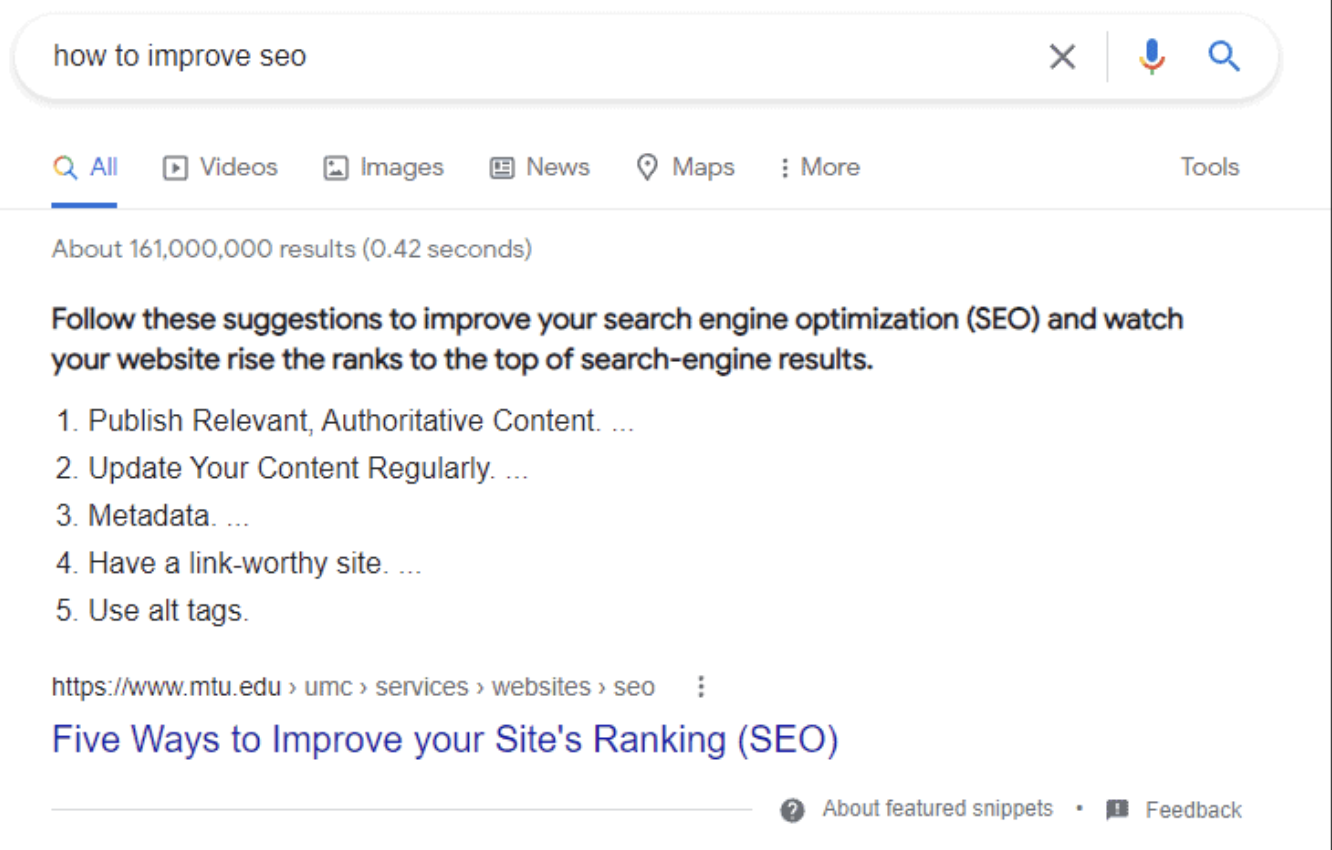
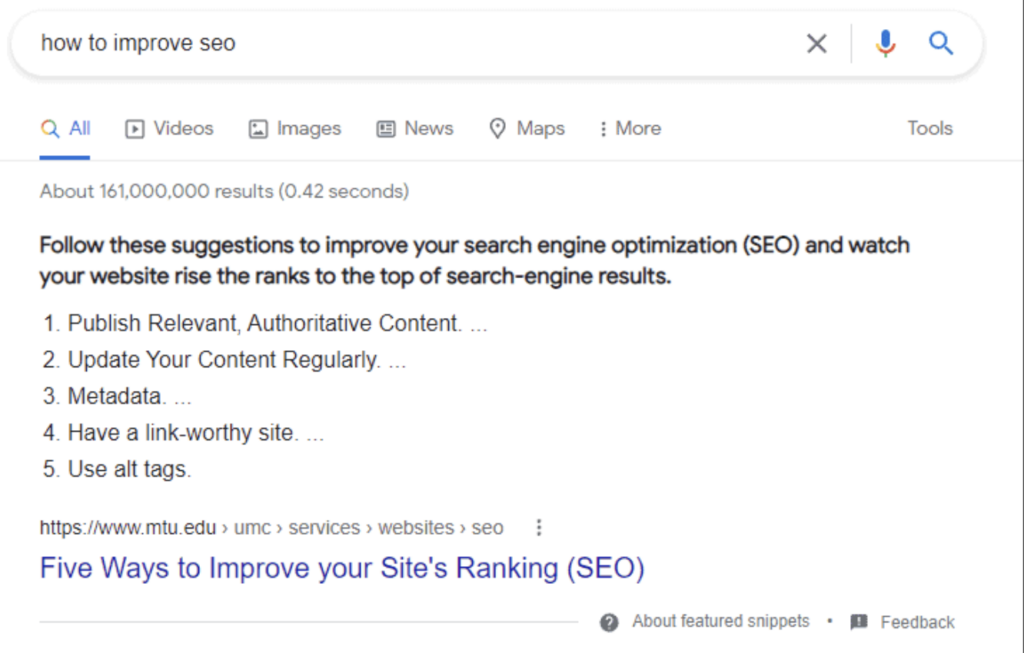
A featured snippet is a highlighted box that appears at the top of organic search results, pulling a direct answer from a webpage to address the searcher’s query. Featured snippets typically include a short paragraph, a numbered or bulleted list, or a table, depending on the nature of the question.
Featured snippets are especially valuable because they often appear above the first organic listing, earning the informal nickname “position zero.” Websites that win featured snippets tend to see increased click-through rates, even though the snippet itself sometimes answers the query well enough that users don’t click through at all.
To optimize for featured snippets, structure your content so it directly answers common questions within the first few sentences of a section. Use clear formatting, such as numbered lists for step-by-step processes or tables for comparison data, since Google frequently pulls these formats verbatim.
What Is a Knowledge Panel?
A knowledge panel is an information box, usually appearing on the right side of desktop search results, that summarizes key facts about a person, place, organization, or thing. Knowledge panels pull data from sources like Wikipedia, Google’s Knowledge Graph, and verified business listings.
Businesses can influence their knowledge panel by maintaining accurate information across platforms like Google Business Profile, Wikipedia, and other authoritative databases. While you can’t directly request a knowledge panel, consistent and verifiable information across the web increases the likelihood that Google will generate one.
What Is the “People Also Ask” Box?
The “People Also Ask” (PAA) box displays a list of related questions that expand to reveal brief answers when clicked. Each time a user expands a question, Google often loads additional related questions, creating an evergreen list of search intent variations.
PAA boxes are valuable for keyword research because they reveal the exact phrasing people use when searching for related topics. Content creators can use these questions to build out FAQ sections, which increases the chance of capturing additional PAA placements.
What Is a Local Pack (Map Pack)?
A local pack, also called a map pack, displays a map along with three local business listings relevant to a geographically specific query. Local packs typically appear for searches that include location-based intent, such as “coffee shop near me” or “plumber in Austin.”
Businesses can improve their chances of appearing in local packs by optimizing their Google Business Profile, gathering positive reviews, and ensuring consistent name, address, and phone number (NAP) information across directories.
What Are Image and Video Carousels?
Image and video carousels display a horizontally scrollable row of visual content related to the search query. These carousels are common for queries with clear visual intent, such as “modern kitchen designs” or “how to tie a tie.”
Optimizing for image carousels involves using high-quality, properly compressed images with descriptive file names and alt text. For video carousels, platforms like YouTube benefit from clear titles, structured descriptions, and relevant tags that align with search intent.
What Is a Sitelinks Result?
A sitelinks result displays additional links beneath a primary organic listing, directing users to specific sections of a website, such as a contact page, product category, or blog. Sitelinks typically appear for branded searches or when a website has strong internal linking and site architecture.
While you can’t directly control which sitelinks Google displays, clear site structure, descriptive page titles, and logical internal linking all increase the likelihood of earning this feature.
What Are AI Overviews?
AI Overviews are Google’s AI-generated summaries that appear at the top of search results, synthesizing information from multiple sources to answer a query directly within the SERP. Introduced as an expansion of the Search Generative Experience, AI Overviews represent one of the most significant shifts in how search results are presented.
AI Overviews tend to pull from content that is well-structured, fact-dense, and clearly organized around specific questions. Because this feature summarizes information rather than linking to a single source, websites cited within AI Overviews may see different traffic patterns compared to traditional organic rankings.
Why Do SERP Features Matter for SEO?
SERP features matter because they directly influence click-through rates, brand visibility, and the overall user experience on a search results page. A business that doesn’t understand which features appear for its target keywords is effectively optimizing for a results page that no longer reflects reality.
Choose to prioritize SERP feature optimization if your target keywords frequently trigger snippets, PAA boxes, or AI Overviews, since these zero-click or position-zero features can dominate visibility regardless of where you rank organically. On the other hand, if your target queries rarely trigger these features, traditional on-page SEO and link building may still deliver stronger returns.
SERP features also shape how AI-driven search tools and generative engines interpret and cite content. Structuring content to win featured snippets or PAA placements often improves the same content’s chances of being referenced in AI-generated answers, since both systems favor clear, well-organized information.
How Can You Optimize Content for SERP Features?
Winning SERP features requires a combination of structural, technical, and content-based strategies. Here are the most effective approaches:
Answer questions directly and early. Structure your content so that the first sentence or two of a section directly answers the implied question. Avoid burying the answer beneath lengthy introductions or unrelated context.
Use clear formatting for scannable content. Numbered lists, bullet points, and tables are more likely to be pulled into featured snippets than dense paragraphs. Match your formatting to the type of answer you’re providing—steps call for numbered lists, comparisons call for tables.
Implement structured data (schema markup). Schema markup helps Google understand the context of your content, increasing the likelihood of qualifying for rich results like review stars, recipe cards, or FAQ snippets. Common schema types include FAQ, HowTo, Article, and LocalBusiness.
Build out FAQ sections targeting real search queries. Research the “People Also Ask” box and tools that surface related questions, then address those exact questions within your content using self-contained, concise answers.
Optimize visual content for carousels. Use descriptive file names, compress images for fast loading, and include relevant alt text. For video, ensure titles and descriptions align closely with the search intent of your target keywords.
Maintain consistency across authoritative sources. For knowledge panels and local packs, keep business information consistent across your website, Google Business Profile, and third-party directories like Yelp or industry-specific listings.
What’s Next for SERP Features?
SERP features continue to evolve as Google integrates more AI-driven technology into search. AI Overviews, in particular, represent a shift toward summarized, conversational answers that may reduce traditional click-through rates even as they increase brand exposure within the search results page itself.
The businesses that adapt fastest will be the ones that treat SERP features as a core part of their content strategy rather than an afterthought. Start by auditing which features currently appear for your target keywords, then restructure your highest-priority content to match the format Google favors for those specific features.
Understanding and optimizing for SERP features isn’t a one-time project. As Google continues to test and roll out new feature types, staying current with these changes will remain essential for anyone serious about organic visibility.
Frequently Asked Questions
What is the difference between a SERP feature and a regular organic result?
A regular organic result is a standard blue link with a title, URL, and meta description. A SERP feature is a specialized format—such as a featured snippet, knowledge panel, or carousel—that presents information differently and often appears in a more prominent position on the page.
How long does it take to rank for a featured snippet?
There’s no fixed timeline for earning a featured snippet. It depends on factors like your current ranking position, the quality of your content structure, and how competitive the target keyword is. Pages that already rank in the top five organic positions have a higher likelihood of being selected.
Can you pay to appear in SERP features?
No, SERP features like featured snippets, knowledge panels, and PAA boxes are earned through organic optimization, not paid placement. Separate paid features, like shopping ads or sponsored carousels, are distinct from organic SERP features and require ad spend.
Do SERP features reduce website traffic?
Some SERP features, particularly featured snippets and AI Overviews, can reduce click-through rates because they answer the query directly on the results page. However, they can also increase brand visibility and credibility, which may lead to more traffic over time as users become familiar with your brand.
Are SERP features the same on every device?
No, SERP features can vary between desktop and mobile search results. Knowledge panels, for example, often appear in a different layout on mobile devices, and some features like certain carousels may be more or less prominent depending on screen size.
Wait! Before You Go, Read:
 Dropbox Hidden Features: 6 Tips to Unlock Its Power
 On-Page SEO: What You Need to Know to Optimize Your Web Pages
 How to Double the Visits to Your Site, Without Doing Internet Marketing!
 Best Sales Chatbot: 5 Choices + Tips and Features
 Gmail Workspace Labs: The New Features With AI
 Micro-SEO Strategies: 6 Foolproof Ways to Boost Rankings
 4 Powerful SEO Tips That Still Drive Traffic This Year
 Optimize Your Online Store with Top 11 WooCommerce Plugins
 12 Tips to Optimize Your Conversion Rate
 Checklist: Features You Should Check When Buying An Ecommerce Business
 Tiny Ranker: Keep Track Of Your Site Rankings And Onpage Seo Efforts
 GZone Tournament System and Features for Online Card Players
 Top Enterprise SEO Strategies That Drive Growth at Scale
 What Are the Top Features of Claims Tracking Software That Improve Claims Handling Efficiency?
 Do You Think You Know SEO? Let’s Check It!
 How to Compare Forex Brokers: Key Features to Consider
 Building Brand Recognition Using SEO
 Spotibo: A New On-Page SEO and Analysis Tool You Need to Use
 7 SEO Metrics to Make Sure Your Search Campaigns Are Healthy
 Local SEO 101: Everything You Need to Know to Get Started
 Affiliate Marketing: 4 Amazing Tips to Optimize Your Campaigns
 Topical Authority: How to Build Niche Authority in 7 Steps
 How SEO Helps Aussie Small Businesses Get Found Without Paying for Every Click
 What SEO Services Can Law Firms Expect When Working With Rankings.io?
 What Makes Some Businesses Show Up First On Google In Singapore With Local SEO?